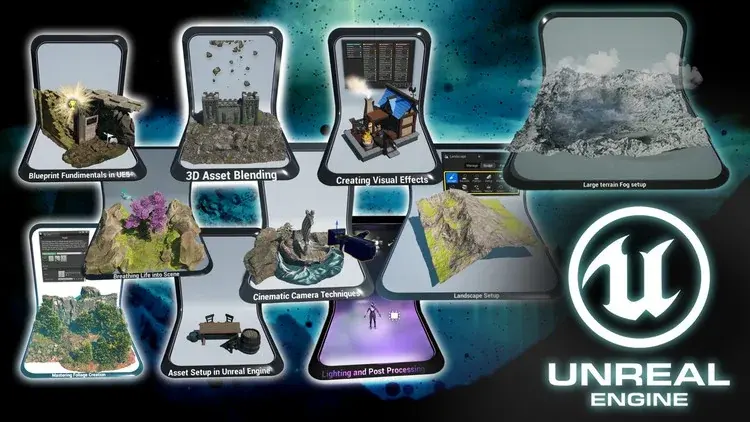
Course/Training Unreal — Creating Stunning Environments in UE5 Game Artist Bootcamp
Unreal Training Course - Creating Stunning Environments in UE5 Game Artist Bootcamp, suitable for beginners and professionals looking to improve their skills.
Syllabus
•Session 1 (1.5 hours): Introduction to Unreal: history, uses, and industry scope
•Session 9 (1.5 hours): Simple case study: Unreal application in the workplace
•Session 10 (1.5 hours): Basic material review & comprehension quiz
Enroll in This Course
Unreal Course — Creating Amazing Environments in UE5 Game Artist Bootcamp
Unleash Your Creativity: Master UE5 Environment Design for Immersive Gaming – Comprehensive Game Artist Training Camp
What You Will Learn
• Complete introduction to Unreal Engine 5 (UE5)
• Develop skills in stamp collections, interactive doors, and floating collectibles with UI messages
• Set up studio lighting, night scenes, and day/night cycles using UE5's built-in tools
• Learn to import and prepare assets with PBR textures and seamless materials
• Understand vertex painting, physics-based object scattering, and distance field blending
• Learn how to leverage foliage tools to create organic scene compositions
• Utilize UE5's foliage tools for vegetation and natural environments with Quixel mixer library
• Create landscape materials that allow you to automatically texture terrain and add custom details to it
• Create mountains using height map data with textures generated based on height
• Sculpt terrain using height data, and apply fog using depth-masked fields and volumetric materials
• Add movement to materials, and learn all about the Niagara fire system
• Bring your work to life by adding buzzing bee swarms to your game environment, and use the Niagara particle system to animate them
• Learn how to perform color grading to take your work to the next level
• Learn how to use HDRI as a background for 3D models for your portfolio
• Master camera turntable, handheld close-up shots, and camera transition shots
• Render 3D environments to a high level for a professional 3D artist portfolio using Unreal Engine 5
• Completing this bootcamp course will be your first stepping stone to creating your own 3D worlds and game environments as a UE5 artist
Requirements
• To have a computer (Microsoft, Linux, or Mac)
• To have downloaded Unreal Engine 5.1+
• To download all course resources including download packages
Description
Are you a game designer looking to create truly immersive and amazing environments for your next project?
Visit our game artist training camp, where we will guide you through every step of the process of creating various amazing environments in Unreal Engine 5 (UE5).
Frequently Asked Questions
Is this Unreal course suitable for beginners?▾
The material is structured gradually starting from basic concepts, so participants without prior experience can still follow along with instructor guidance.
What is the learning method?▾
Live online classes via Zoom with experienced instructors, hands-on practice, and recorded sessions that can be replayed. In-house training options are also available for companies.
Is there a final project that can be used for a portfolio?▾
Yes, each participant completes an end-to-end mini project that can be directly used for a portfolio or thesis/dissertation materials.
Do I get a certificate after completion?▾
Yes, participants who complete the program receive an official e-certificate from Cerdas Inovasi Digital.
How do I register?▾
Click the registration button on this course page or contact our admin for schedule consultation and packages that suit your needs.
Environments are an essential part of any game, whether you're creating a first-person shooter, role-playing game, or even a virtual reality experience. That's what attracts players and immerses them in the world you've created. However, creating amazing environments can be a daunting task, especially for those new to game design or unfamiliar with Unreal Engine 5.
That's where our game artist bootcamp comes in. Our comprehensive course is designed for both beginners and experts and covers everything you need to know about creating amazing environments in Unreal Engine 5. From asset setup to lighting and special effects, we will guide you through every step of the process to help you bring your vision to life.
Top 8 points of 'Creating Amazing Environments in UE5: Game Artist Training Camp':
Dynamic Lighting: Set up studio lighting, night scenes, and day/night cycles using UE5's built-in tools;
Cinematic Camera: main camera turntable, handheld close-up shots, and camera transition shots;
3. UE5 Blueprint Fundamentals: developing skills in stamp collections, interactive doors, and floating collectibles with UI messages;
4. Comprehensive Asset Setup: learn to import and set up assets with PBR textures and seamless materials;
5. Asset Blending: master vertex painting, physics-based object scattering, and distance field blending;
6. Large Terrain Creation: sculpting using height data, and applying fog using depth-masked fields and volumetric materials;
Foliage Creation: leveraging foliage tools for vegetation and natural environments with Quixel mixer library;
8. Movement in Environment & VFX: adding movement to materials, and animating insects and fire using UE5's Niagara particle system.
Your project is to experiment with 10 different Unreal Engine 5 bootcamp projects after taking our course lessons. From learning how to set up cinematic cameras in Unreal Engine 5 (UE5), to creating blueprints, setting up and blending assets, and creating terrain, this course comes with projects for everyone. Of course, you can set your own challenges and diversify aspects or details of each project, such as using assets you already have from other projects. You can modify the length or complexity to make your UE5 environment come alive as you improve your skills.
Course Overview
Are you ready to take your game design skills to the next level?
Our game artist bootcamp is the perfect place to start. With 10 comprehensive sections covering every aspect of creating amazing environments in Unreal Engine 5, you will learn everything you need to know to create immersive and amazing environments that attract players and keep them engaged.
'Creating Amazing Environments in UE5: Game Artist Training Camp' is divided into 10 sections, each covering a different aspect of creating amazing environments in Unreal Engine 5. Here is a detailed overview of what you can learn in each section.
Section 1: Asset Setup
First impressions matter, and in game design, the assets you use play an important role in determining the atmosphere of your environment. In this section of the course, you will learn how to import assets, set up textures, and create perfect blends to create a cohesive environment that sets the stage for gameplay.
– Importing Assets
o Adding FBX meshes to Unreal Engine 5 (chairs, barrels, tables, buckets)
– Setting Up PBR Textures
o Creating shader materials for basic PBR texture setup
– Setting Up Seamless Textures
o Creating customizable materials for seamless textures that allow you to control texture scale and color
o Setting up wood, metal, and water materials, including transparency settings
Section 2: Asset Blending
Creating a cohesive environment is essential to immersing players in the world you've created. In Section 2, you will learn how to blend assets to create realistic and seamless environments that feel natural and immersive.
– Vertex Paint Material Setup
o Creating point-based blending materials that allow you to paint moss on castle walls
– Physics-Based Object Scattering
o Setting up collisions, enabling physics on objects, and scattering them while running scene simulations, then saving the locations of scattered rocks
– Distance Field Blending Material Setup
o Creating opacity mask-based blending materials that allow you to blend rock textures with landscape using dithering effects
Section 3: Terrain Sculpting and Texturing
Creating realistic landscapes is essential to immersing players in the game world. Here, you will learn how to sculpt and create terrain textures to create lifelike landscapes that will attract players and make them feel like part of the world you've created.
– Sculpting Landscape
o Learning how to use height data information to generate terrain. We will also use UE5's built-in sculpt mode. 'Creating Amazing Environments in UE5: Game Artist Training Camp' will have you sculpt terrain using basic brushes combined with noise brushes and adjust large-scale terrain with more complex tools such as the terrain stamp tool
– Creating Landscape Materials
o Creating attribute-based landscape materials to texture terrain based on painted weight data and height map blending
– Terrain Texturing
o Learn to blend terrain textures with height and weight data for landscape
Section 4: Large Terrain Fog Setup
Adding fog to your environment can create depth and atmosphere, but it can be difficult to do correctly. In Section 4, you will learn how to use fog to add depth to your environment and create the desired mood and atmosphere, whether in bright daylight or dark and gloomy nights.
– Height Fog Usage
o Using exponential height fog tools to create mountain depth based on its distance from the camera
– Creating Fog Plane Material
o Creating materials for planes that create controllable fog planes with custom depth masking and camera distance-based opacity
– Volumetric Fog Setup
o Creating another variant of fog material; volumetric fog. This will give three-dimensional (3D) depth to the fog in the scene
Section 5: Mastering Foliage Creation
Adding foliage to your environment can make it feel more alive and immersive. In this section of 'Creating Amazing Environments in UE5: Game Artist Training Camp' , you will learn how to add grass, bushes, and trees to your environment and create natural and beautiful landscapes that feel full of life.
– Using Foliage Tools to Set Up Grass
o Using the Quixel mixer library to add grass and bushes using foliage tools and learning how to use pre-set material instances to change colors
– Placing Larger Foliage Assets
o Learning how to get free Quixel tree assets from the UE5 marketplace, how to set up wind system actors for those assets, and how to control seasonal color changes on trees
– Painting Large Areas Using Foliage Tools
o Painting the preset environment with foliage sets, and making the most of foliage tools by adjusting their values to be placed throughout our natural scenery
Section 6: Creating Visual Effects
Special effects can take your environment to the next level and add an extra layer of experience for players. You will learn how to create smoke, fire, and water animations to create realistic and dynamic environments that feel alive and breathing.
– Creating Niagara Smoke Particles
o Setting up smoke particles for chimneys using UE5's Niagara System
– Creating Animated Fire Particles
o Setting up SubUV textures for fire particle animation with controllable color variations
– Animating Water Materials
o Learning how to add real-time animation to water materials to have constant panning movement and ripple distortion
Section 7: Lighting
Lighting is a critical aspect of creating amazing environments, as it can set the mood and atmosphere of the world you've created. In Section 7, you will learn how to light your environment to create the desired mood and atmosphere, whether it's bright and cheerful daytime or dark and gloomy nights.
· Studio Lighting
o Setting up Skybox with a 3-point light system to get a controlled lighting environment in the scene
· Night Scene
o Using UE5's built-in environment lighting tab combined with post-process effects to create night scene lighting
· Day/Night Cycle
o Using UE5's built-in Sun Position Calculator plugin to get accurate sun position
o Creating sun movement by modifying its blueprint system
o Adding a starry sky that only appears at night by fully leveraging auto-exposure which simulates brightness adjustments like your eyes do
Section 8: Cinematic Camera Techniques
Using cinematic camera techniques can produce professional-looking imagery that captures player attention and makes them feel part of the action. Here, you will learn how to use camera techniques to create amazing and dynamic shots that will keep players engaged and immersed in the game.
· Camera Turntable
o Setting up a camera mounted on an object rotating around a Viking ship using level sequencer animation
· Handheld Close-Up Shot
o Creating camera shake movement from a blueprint template that randomizes camera rotation to simulate jitter
· Camera Transition Shot
o Learning how to set up controls for post-process and camera controls in UE5's level sequencer to create transitions between camera shots (fades and blurs)
Section 9: Bringing Life to the Scene
Adding life to your environment can make it feel more dynamic and immersive. You will learn how to add movement to foliage, create buzzing bee swarms, and animate flying birds to create natural and dynamic environments that feel full of life.
· Foliage Movement
o Using UE5's wind nodes to create movement in foliage
· Bees Using Niagara
o Using the Niagara particle system to control bee mesh swarms to buzz around
· Flying Birds
o Learning how to import a rigged bird character with animations and set it up in UE5 to fly through the air
We're excited for you to share your UE5 environment for your portfolio with us. Go beyond the taught material and make your bee swarm simulation even grander by modeling it and adding animation cycles to it using software, such as Blender.
Section 10: Blueprint Fundamentals
Blueprints are an essential tool for creating interactivity and functionality in your games. In this section of 'Creating Amazing Environments in UE5: Game Artist Training Camp' , you will learn Blueprint fundamentals and how to create prefab asset collections, interactive doors, and floating collectibles to make your game more engaging and dynamic.
· Creating Asset Prefab Collections
o Setting up mesh tiles as blueprints and as item collections so they can be placed on the map which can then be customized in real-time all at once
· Interactive Doors
o Changing UE5's play mode to first-person perspective. Creating doors using blueprint code that allows you to open them using an interactive button
· Floating Collectible Objects
o Creating floating and spinning animations using blueprint timeline. Creating text UI to display custom messages every time a user 'picks up' an object
This Course is For:
– Game designers who want to improve their skills and create more immersive environments
– Artists who want to specialize in environment design for games or other virtual experiences
– Students interested in game design or 3D modeling and want to learn more about how to create environments in Unreal Engine 5
– Anyone who wants to learn how to create amazing and immersive environments in Unreal Engine 5
Learning Methods at Cerdas Inovasi Digital
Live online classes via Zoom with experienced instructors, hands-on practice with real-world case studies, and replayable session recordings. In-house training packages are also available for corporate needs throughout Indonesia.
Contact us for schedule consultation and packages that best suit your needs.